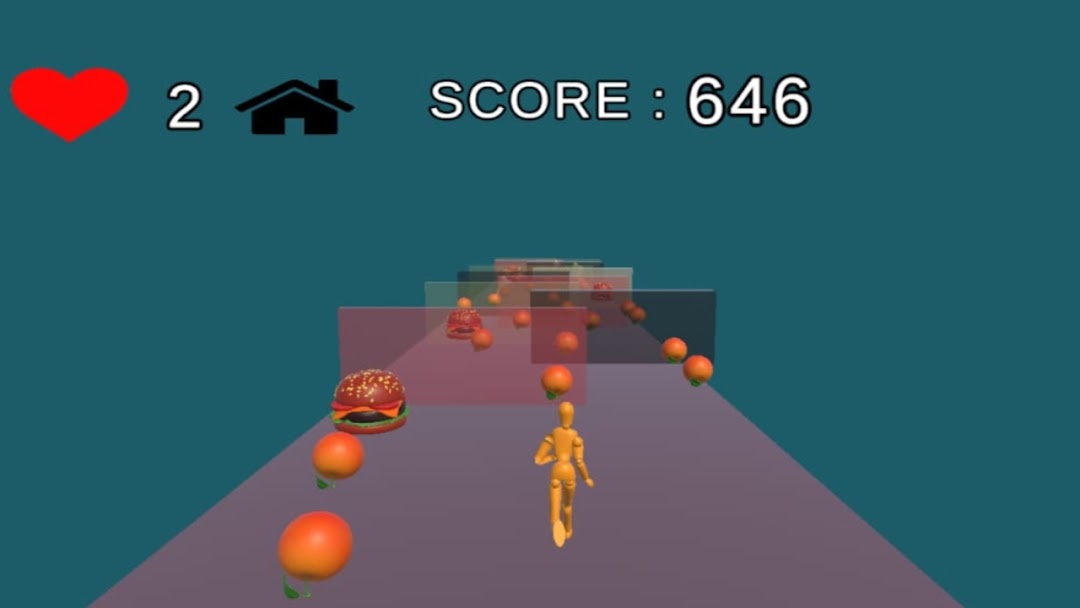
m runner is a Racing game developed by S Maruthi. LDPlayer is the best platform for playing m runner on Windows PC, providing robust features to help you achieve an immersive experience in m runner.
When playing m runner on your computer, if you prefer using your own gamepad to control the game, LDPlayer's automatic gamepad detection can assist you in customizing controls with just a few simple clicks, allowing you to enjoy more realistic racing scenes and challenges.
With support for high frame rates, the game's diverse track designs and rich terrain and environmental changes become even more lifelike and detailed.
Additionally, the video recording feature makes it easy for you to capture all the exciting and amusing races and game content, making it convenient to share with friends or create videos. Start downloading and playing m runner on your computer now!
Hai all Thankyou for playing the gamem runner game is a infinite running game you want to get high score to win the game
FIRST CLICK ON PLAY BUTTON TO START THE GAME AND GAME WILL BE STARTED IN 10 SEC
PLAYER CONTROL : 1) GENTLY MOVE YOUR FINGER LEFT TO MOVE PLAYER LEFT SIDE.
2) GENTLY MOVE YOUR FINGER RIGH TO MOVE PLAYER RIGHT SIDE.
FOR COLLECTING EACH COIN YOU WILL GET 1 POINT AS SCORE
FOR COLLECTING EACH FRUIT YOU WILL GET 5 POINTS AS SCORE
FOR COLLECTING EACH ICE CREAM YOU WILL GET 10 POINTS AS SCORE
FOR COLLECTING EACH BURGER YOU WILL GET 20 POINTS AS SCORE
IF YOU HIT OBJECTS YOUR HEALTH WILL BE DECREMENTED AND SCORE WILL BE DECREMENTED
IF YOU WANT MORE HEALTH CLICK ON HEART ICON
IF YOU WANT TO GO HOME CLICK ON HOME ICON
IF YOU WANT TO PLAY GAME AGAIN CLICK ON PLAY AGAIN BUTTON
IF YOU WANT TO RESUME GAME CLICK ON RESUME BUTTON
IF YOU WANT TO EXIT THE GAME CLICK ON EXIT BUTTON
ON CLICKING EXIT BUTTON A DIALOG BOX APPEARS ON SCREEN NOW CLICK " YES" TO EXIT THE GAME OR CLICK "NO" TO PLAY THE GAME
THIS IS MY SECOND APPLICATION GIVE ME FEEDBACK
IF YOU FACE ANY PROBLEM
THANK YOU !